Do you like having your materials all neatly organized into different chests, but hate the work required to organize them? Do you find yourself dumping everything into one chest, to deal with it later? MondoChest is for you.
Links
How it Works
MondoChest lets you designate a master chest (by using a special sign) where you can dump your stuff. You then designate "slave" chests where your stuff will go to. They can be downstairs, upstairs, in another room, however you like (within a configurable radius.)
MondoChest will then see what's in each chest, and then decides where things get 'shelved' based on what's already in there. For example, one slave box has rails and powered rails in it, and another has wood planks and logs in it. If you dump wood into the master chest, it will be moved into the appropriate slave.
How to Use
Step 1
Designate a master chest by putting a "[MondoChest]" sign next to the chest.
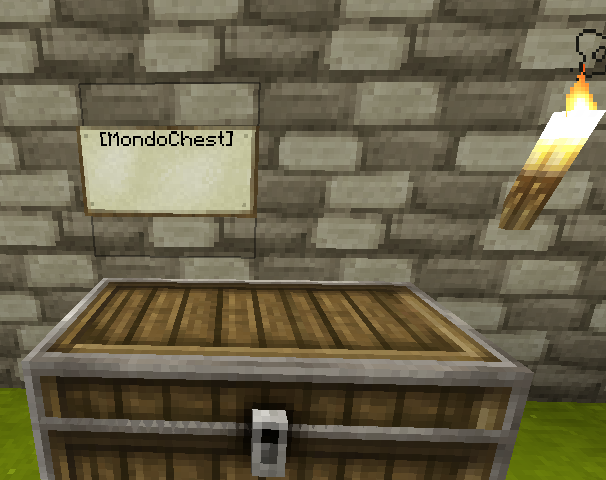
now right-click the MondoChest sign, you should see a message like: MondoChest: Created bank with 0 chests.
Step 2
For any storage chests you have, create a sign with the first line containing "[MondoSlave]" next to the chest.
Note the sign must be a wall-mounted sign, signs standing on posts will not work.
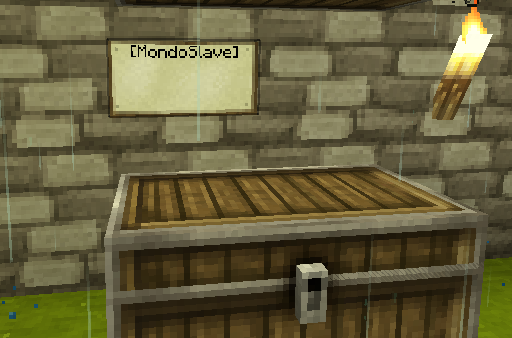
right-click the slave sign to add it to the MondoChest bank you created, and repeat for any number of slave chests.
You will see a message like: MondoChest: Added 2 slaves to bank
Step 3
Any time you have new items to sort, dump items into the master chest and then right-click the MondoChest sign. Items will be moved into a slave chest which already contains that item. Any items which don't have a known destination chest will stay in the source chest
Installation/Configuration
To install, place MondoChest.jar in your plugins folder. A configuration file will be created with default configuration.
For detailed configuration docs, read Configuration
Tips and Tricks
- chests can be on any side of the sign, and one [MondoSlave] sign can handle multiple chests, allowing you to save on signs: Chest Positioning Example
- Don't like seeing the signs in your pretty chest room? dig a hole under the chest, and hide the [MondoSlave] sign down there. Sideways signs can also go behind chests in the wall.
- Multiple master chests can share the same slave chests. For example, you can have a MondoChest at the front gate and another at the rear gate of your castle, and everything gets shelved into the slaves in the castle vault downstairs. Do this by clicking one master, then run around right-clicking all the slaves to add them to the master. Repeat this for any other masters.
Planned Features
- Fine-grained access control per chest (0.7)
- more powerful limit configuration (0.7)
- MondoFurnace!!! (0.7.1)
- (Re)load dispensers (0.7.1)
Limit number of MondoChests per user (0.6.1)Specific users per MondoChest (0.6)Chest protection (0.6)Support multiple chests for a single item type, e.g. multiple chests for cobblestone (0.5)Cache found chests across server restarts (0.5)Multiworld support (0.4)Permissions (0.4)